

Tiffany and Gold Wrapping Paper Templates for Custom Gifts
A polished gift wrap can feel personal without looking crowded. Tiffany and gold wrapping paper templates include designs with logo or photo areas, as well as Tiffany marine and molten gold marble patterns.
Both styles have their appeal. A logo or photo adds a personal touch, while a marble pattern brings colour and texture without extra details.
This guide explains how to compare the designs and choose one that suits the recipient, occasion, and look you have in mind. Learn what to check in editable templates, how logo and photo spaces affect a layout, and what distinguishes marine and molten gold marble patterns. A few thoughtful choices can make the wrapping feel more personal.
Key Takeaways
- Look for a clear logo or photo area when you want the wrapping to feel personal without crowding the design.
- Compare Tiffany marine patterns with molten gold marble to find the mood that suits your gift.
- Choose a file format that fits how you plan to edit and print your template.
- Plan the printable dimensions and resolution around your paper size and the level of detail in the artwork.
Templates with logo or photo areas
A logo or photo space can make a repeating Tiffany-blue-and-gold pattern feel personal. Choose a layout where the detail looks intentional, not squeezed between decorative elements.
Use Tiffany & Co. logos or branding only with permission. Otherwise, choose a general Tiffany-blue-and-gold palette and original wording, without the company name or logo.
First, check for a clearly marked blank area. A frame, open panel, or reserved label space can hold a family photo, monogram, or your own brand mark. A small centered photo might suit a birthday gift, while a discreet logo could work on wrapping for a business event.
Consider the recipient before choosing what to put in the space. A family photo can make a holiday present feel warm and familiar. Initials or a short name can help distinguish gifts under the tree. For a client or colleague, a simple original mark may feel more suitable than a personal snapshot.
Next, look at the pattern around the open area. Large gold swirls can compete with a detailed photograph, while a fine marble texture may keep the image easy to see. Tiffany marine tones can give a photo a crisp border. Molten gold accents feel richer, but work best when the focal point remains clear.
Before editing, follow these practical steps:
- Choose the photo, initials, or original logo you plan to use.
- Place it inside the template’s reserved area, rather than over a busy motif.
- Keep important faces and lettering away from the edges where folds may hide them.
- Preview the repeating pattern to see how the personal detail appears across the sheet.
A portrait placed near the center of a repeating pattern may appear multiple times across a large printed sheet. If you want one prominent image, choose a layout with a single open panel rather than a small repeated space. This distinction matters when folding the paper around a box.
Consider how the finished wrap will be seen. A small name may be legible on a gift tag but hard to notice across patterned paper. A high-contrast photo or simple initials can stand out without overwhelming the marine-and-gold design. Preview the layout to spot crowded areas before printing.
Timing can also shape which layout is practical. The product listing estimates delivery by Oct 30 with expedited shipping, while the product listing estimates delivery by Nov 9 with standard shipping. Check the estimate that matches your shipping choice before settling on a design, especially if the wrap is for a planned occasion. That leaves time to review the printed result and make sure the photo, initials, or original mark remains visible after folding. Keep the focal area simple so the finished paper still feels balanced when it arrives.
What file formats are available for wrapping paper templates (PDF, PNG, SVG)?
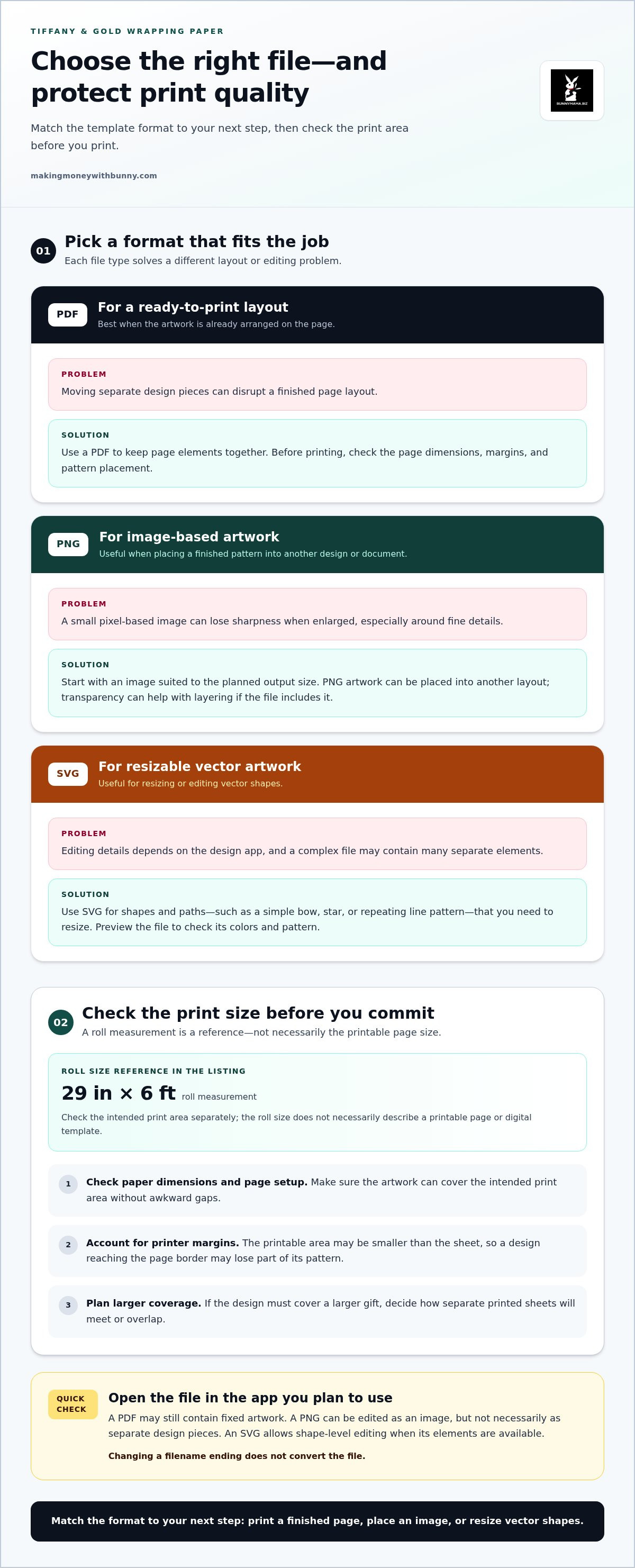
PDF, PNG, and SVG files suit different wrapping-paper workflows. Choose based on whether you want to print a finished layout, place artwork into another design, or resize vector shapes. Check the file extension before editing: changing a filename ending does not convert the file.
PDF for a ready-to-print layout
A PDF keeps page elements together, helping preserve a set layout when opened on another device. It’s a practical choice when the artwork already fills the page and you want to print without moving separate design pieces. Open the PDF and check the page dimensions, margins, and pattern placement before printing. If you need to rearrange the design substantially, an editable source file may be more convenient.
PNG for image-based artwork
A PNG stores artwork as pixels, making it useful for placing a finished pattern into a design or document. For example, position a Tiffany-blue motif with gold accents in a page layout, then resize it to fit the paper. Enlarging a small PNG can soften its edges, so start with an image suited to the planned output size. Transparency can help when layering artwork over a coloured background, if the file includes it.
SVG for resizable vector artwork
An SVG stores shapes and paths rather than a fixed grid of pixels, making it useful for resizing clean motifs such as a simple bow, star, or repeating line pattern. How you edit SVG details depends on your design app, and complex files may contain many separate elements. Preview the artwork after opening it to check that the colours and pattern look as intended.
Use this quick selection guide:
- Choose PDF when the page is already arranged for printing.
- Choose PNG when you need a ready-made image to place into another layout.
- Choose SVG when you need to resize or edit vector shapes.
Before printing, open the file in the app you plan to use and check what can be edited. A PDF may open successfully but still contain fixed artwork. A PNG can be edited as an image, but not necessarily as separate design pieces. An SVG allows shape-level editing when its elements are available. For Tiffany and gold wrapping paper templates, matching the file format to your next step can save time and preserve the intended pattern.
What dimensions and resolution should a printable wrapping paper template use?
Start with the size of the paper you plan to print, not the size of the gift box. A wrapping-paper roll listing gives a reference size of 29 in x 6 ft. That measurement describes the roll, not necessarily a printable page or digital template. Check the intended print area, then make sure the artwork can cover it without awkward gaps.
A home printer’s printable area may be smaller than the sheet itself. Margins can leave unprinted edges, so a design that reaches the page border may lose part of its pattern. Check the file’s page setup against the paper dimensions. If the design needs to cover a larger gift, plan how separate printed sheets will meet or overlap.
Resolution describes the image detail available at a chosen print size. A raster image, such as a PNG, contains pixels. Enlarging it too far can soften fine details, especially small lettering or thin gold lines. A vector file, such as an SVG, stores shapes differently and can often be resized without the same pixelation. The result still depends on the file’s contents and the software used to open it.
Use these steps before printing a Tiffany-and-gold design:
- Measure the paper area you want to cover, including any extra material needed to wrap the box.
- Set the document to match the printable sheet or planned panel layout.
- Inspect small details, such as marble veins, narrow borders, and text, at the intended size.
- Print a test page and check the edges, colours, and pattern alignment before making more copies.
Repeating patterns need particular care. A marine-blue motif may line up neatly across adjoining sheets, while a large molten-gold swirl can create a noticeable break. Preview the repeat at the final page size, and keep important elements away from edges that may be trimmed or hidden by folds.
The right resolution depends on the artwork, its final print size, and the printer’s output. A small preview can look crisp on screen but reveal softness when enlarged. For Tiffany and gold wrapping paper templates, check both the page dimensions and the smallest design details before printing. Explore editable gift-wrap designs as you plan a printable layout for your next present.
Bunnymama.biz: DWA 4.0 resources
Bunnymama.biz offers DWA 4.0 resources for readers exploring digital business learning, alongside social media guides. For a ready-made holiday project, its 50 Christmas Wrapping Paper Templates - Tiffany & Gold Collection | Editable Designs with PLR License brings editable gift-wrap designs together in one collection.
Choose this printable if you want Tiffany-and-gold holiday artwork without building a wrapping pattern from scratch. Bunnymama.biz also offers Holiday Printables & Kids' Activities for families planning seasonal activities alongside gift wrapping.
Browse the collection at your own pace and choose the resource that fits your next step. Visit makingmoneywithbunny.com when you’re ready to explore.
Make Your Next Gift Feel Like Yours
Thoughtful wrapping can become part of the gift itself. Before printing, decide how you want the recipient to feel: festive, polished, playful, or personally remembered. That choice can guide the colours, pattern, and finishing touches.
Use Tiffany and gold wrapping paper templates as a starting point, then personalize the presentation with a handwritten tag or ribbon suited to the occasion. You don’t need to change every detail. One personal touch can make a familiar design feel considered and special.
If you’re ready to explore a resource for your next seasonal project, take a quiet look at Bunnymama.biz. Explore Bunnymama.biz resources and choose a next step that feels right for you. A little creativity can make gift giving feel warmer, one package at a time.
Frequently Asked Questions
Where can I find Tiffany blue and gold wrapping paper templates to download?
You can find editable Tiffany-blue-and-gold holiday designs in Bunnymama.biz’s 50 Christmas Wrapping Paper Templates - Tiffany & Gold Collection | Editable Designs with PLR License. It’s a downloadable collection for preparing your own gift-wrap artwork. Before choosing a design, consider the gift’s shape and the look you want, such as a calm marine-blue pattern or a warmer gold-accented style.
Are there free printable Tiffany blue and gold wrapping paper templates?
Bunnymama.biz offers Holiday Printables & Kids' Activities and a downloadable Tiffany & Gold wrapping paper collection. The collection is a downloadable product, not necessarily a free printable. When comparing options, decide whether you want a ready-made design to download or a printable activity for home, then choose the resource that suits your project.