

Start an online business without showing your face with these options
Your face doesn’t have to be the front door to your business. You can start an online business without showing your face by creating faceless content on one or two platforms, bringing readers to a blog, or selling digital products. The best starting point is the option that feels manageable and suits what you enjoy making.
Maybe being on camera feels uncomfortable, or you’d simply rather keep your personal life private. Either way, you can build an online presence without making your face part of it. Share useful ideas, create content, and offer products while keeping the focus on your work.
This guide covers platforms, blogs, digital products, and faceless content formats to try. You’ll see how hands-only demonstrations, written posts, and simple visuals can support a business, then choose a practical first step that fits your routine.
Key Takeaways
- Start with one or two platforms that suit your preferred way to create, rather than trying to be everywhere at once.
- Use a blog to share helpful, searchable content, then consider which digital products could naturally support your readers.
- Explore camera-free formats such as hands-only demonstrations, written posts, and simple visuals to find what feels comfortable.
- Choose a business idea by matching your skills, audience, and available time, then build it one manageable step at a time.
1. Choosing platforms for faceless content
To start an online business without showing your face, choose one or two platforms you can use consistently. Pinterest works well for searchable visuals, while a blog can hold detailed guides. For example, create keyword-focused pins that lead readers to a related blog post.
You can also pitch brands without making on-camera videos. Share content samples, explain how brands can reuse the assets, and include basic performance metrics. A media kit can show your niche, sample visuals, traffic data, and the types of content you offer.
For a U.S. online business, tax reporting and registration depend on your business activity and setup. Keep records of income and expenses, then identify the requirements that apply to your location and business structure.
Startup costs vary by business model and tools. A blog, digital product, and physical inventory have different needs. Before choosing what to launch, list potential costs for a platform, domain, software, payment processing, and materials.
If you want to start an online business without showing your face, follow a practical sequence: choose a niche, define an offer, select a platform, and publish useful content. Then set up a way to take orders, track income and expenses, and improve your offer based on reader response.
Market your business with useful posts rather than relying on face-to-camera videos. Use Pinterest pins to lead readers to helpful blog content, and share product examples or short written tips on your chosen platforms.
Build trust through a consistent name, clear descriptions, and dependable, useful content. Show your process with sample visuals, explain what buyers receive, and answer common questions in posts or product pages.
A phone or computer can help with writing, planning, and product photography. Add tools only when you need them, such as for designing visuals, editing screen recordings, organizing files, or tracking orders and expenses.
Common mistakes include trying to maintain too many platforms, copying content, and promoting an unclear offer. Focus on one or two channels, make original work, and review basic engagement and traffic metrics.
There’s no set timeline for earning money. Results depend on your offer, audience fit, traffic, and how well your content helps readers take the next step.
2. Creating blogs and digital products
A blog gives your ideas a home beyond social media. Choose a focused subject, such as lunch planning for busy parents, and write practical posts that answer specific needs. A guide to building a weekly meal plan, for example, could lead naturally to a printable shopping list. Center each article on one useful problem, with a clear title and helpful next step.
Before creating a product, note the questions readers ask in comments, emails, or search queries. Turn a recurring need into a small, clear offer. Ideas include checklists, planners, templates, short guides, or activity sheets. Make the purpose obvious so buyers understand what the file helps them do before purchasing.
Use a simple workflow to build the first version. Draft the content, check that each page is easy to use, then prepare a product description and sample visuals. For a planner, explain its intended use and what pages it contains. For a guide, put the steps in order and add examples that help readers apply them.
A useful blog and a digital product can support each other. A post about organizing children’s holiday activities might introduce printable activity sheets. A seasonal design example is the 50 Christmas Wrapping Paper Templates - Tiffany & Gold Collection | Editable Designs with PLR License. It shows how a digital file can serve a specific occasion without requiring on-camera content.
Keep the buyer’s path simple: helpful article, relevant product, clear description, and straightforward purchase process. Use descriptive product names, readable previews, and clear instructions for accessing the file. Review reader feedback and update confusing details. A short content calendar can help you plan related posts and product improvements without making everything at once.
If you’re shaping your first offer, explore digital product planning resources as you map a useful idea to a blog topic.
3. Faceless content formats
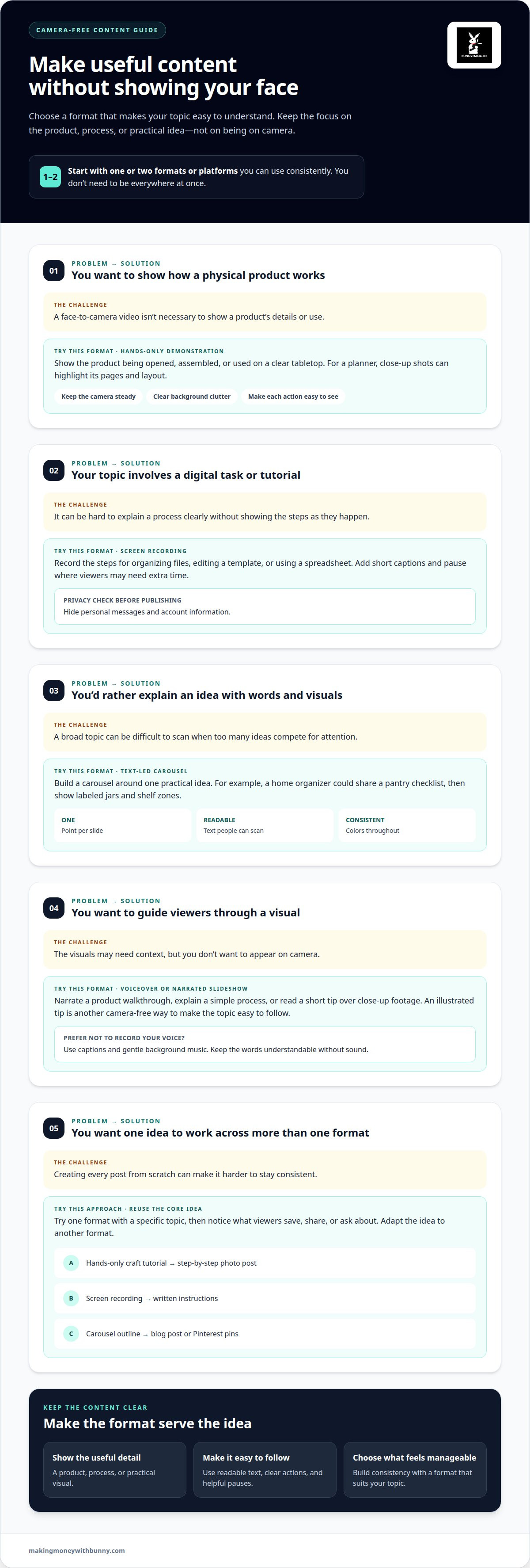
Faceless content can still show useful details and a recognizable point of view. Choose a format that makes the topic easy to understand, such as a product demonstration, screen recording, illustrated tip, or narrated slideshow. A recipe creator, for example, might film ingredients and cooking steps from above, keeping their face outside the frame.
Hands-only demonstrations are one way to create faceless user-generated content. Show a product being opened, assembled, or used on a clear tabletop. For a planner, close-up shots can highlight its pages and layout. Keep the camera steady, clear background clutter, and make each action easy to see.
Screen recordings suit tutorials about digital tasks. Record the steps for organizing files, editing a template, or using a spreadsheet. Add short captions to explain each action, and pause where viewers may need extra time. Hide private details, such as personal messages or account information, before publishing.
For a text-led post, build a carousel around one practical idea. A home organizer could share a pantry checklist, then show labeled jars and shelf zones. Use readable text, consistent colors, and one point per slide. The same outline can become a blog post or a set of Pinterest pins.
Voiceovers add warmth without putting you on camera. Narrate a product walkthrough, explain a simple process, or read a short tip over close-up footage. If you prefer not to record your voice, use captions and gentle background music. Keep the words understandable without sound.
Try one format with a specific topic, then notice what viewers save, share, or ask about. A hands-only craft tutorial could become a step-by-step photo post, while a screen recording could become written instructions. Reusing the core idea helps you stay consistent without inventing a new concept for every platform.
To keep your workflow manageable, choose one or two platforms for a faceless content presence, then adapt the same core idea to each format. A tutorial might become a short captioned clip on one platform and a text-led post on another. Keep the central tip consistent while you learn which presentation suits your audience.
4. What are the best online business ideas that don't require showing your face?
The best fit depends on what you can make consistently and whose problem you understand. A faceless business can focus on useful information, downloadable products, or carefully chosen recommendations. To start an online business without showing your face, choose an idea you can explain clearly and shape a small offer around it.
Digital products suit people who enjoy organizing information or creating practical resources. Examples include meal planners, checklists, study guides, and editable templates. Choose one audience and one need, such as helping families plan school lunches. Create a focused first product, then use reader feedback to improve its instructions and layout.
A niche blog or newsletter can build an audience through helpful writing. A home gardening blog, for example, could share beginner-friendly planting guides and seasonal care notes. Income options may include relevant affiliate recommendations, sponsorships, or your own products. Honest, useful explanations help readers decide whether a recommendation suits them.
Faceless product content can support brand partnerships or user-generated content work. A creator might film their hands assembling a desk organizer, then deliver the finished clips for a brand to use. Build a sample portfolio around a clear category, such as home organization, and describe the assets you can create without appearing on camera.
Printables and activity resources offer another option for makers who enjoy planning family or classroom activities. A themed scavenger hunt, reading tracker, or holiday activity sheet can meet a specific need. Keep the instructions simple, make the pages easy to print at home, and show sample previews so buyers understand the format.
If you want to start an online business without showing your face, compare ideas by the work they require, not promises of quick income. Consider your skills, available time, and interest in ongoing content or product updates. Choose one starting offer, describe its audience and purpose, then create a sample before building a wider catalogue. Explore digital business resources to help shape your next practical step.
Bunnymama.biz: DWA 4.0 resources
Bunnymama.biz offers DWA 4.0 resources and social media guides for readers building an online business behind the scenes. These resources can help you explore digital business ideas and plan content for your chosen platforms.
If you’re interested in selling downloads, Holiday Printables & Kids’ Activities and the 50 Christmas Wrapping Paper Templates - Tiffany & Gold Collection | Editable Designs with PLR License offer examples of digital products. They may be a helpful next step as you consider what kind of resource fits your audience and creative interests.
Visit makingmoneywithbunny.com to explore the resources at your own pace.
Choose a first step that feels manageable
You don’t need every part of your business figured out before you begin. Pick one small task that moves your idea forward, such as drafting a product outline or planning a post. A steady, practical approach can help you build something that fits your life and privacy preferences.
If you want support as you shape your next move, Bunnymama.biz offers DWA 4.0 resources, social media guides, and Holiday Printables & Kids' Activities. These can give you ideas to explore as you build an online business without showing your face, at a pace that feels right for you.
Explore your options with Bunnymama.biz when you’re ready. Your next step can be a small one, and it can still count.
Frequently Asked Questions
Which platforms support faceless content and online businesses?
Pinterest, Instagram, TikTok, YouTube, and LinkedIn can all support content that doesn’t show your face. A blog can host longer articles, while a storefront or marketplace such as Etsy can handle product listings and purchases. Choose platforms based on your audience and offer: a printable seller may need product pages, while a consultant may focus on written posts and useful resources.
How do taxes and business registration work for a U.S. online business?
Tax reporting and registration depend on your business activity and setup. Keep records of income and expenses, then identify the requirements that apply to your location and business structure.
How much does it cost to start a faceless online business?
Startup costs vary by business model and tools. Before choosing what to launch, list potential expenses for a platform, domain, software, payment processing, and materials.