

How to Use Faceless Marketing Resources to Build a Brand
You can build a recognizable brand without making yourself the face of every post. Faceless marketing resources for beginners can help you shape a consistent voice, use brand characters and digital assets, and share useful content without appearing on camera. A 30-day planning window gives you room to build and test a small system, not a promise of sales or search rankings.
If appearing on video feels like one more task in an already full day, that’s understandable. You can still build a personal, welcoming brand by choosing a clear audience, sharing helpful ideas, and keeping your visuals and voice consistent.
Learn how faceless marketing works, which business types may suit it, and how to choose simple resources for your first steps. Then follow a beginner-friendly launch plan, including ways brand characters and reusable digital assets can help you create content more steadily.
Key Takeaways
- Choose faceless assets that fit your audience and the kind of business you want to build, from helpful videos to a consistent brand character.
- Start with free guides and a small set of tools that help you plan, create, and organize content without making the process feel complicated.
- Use a 30-day planning window to test a simple marketing system, learn from audience responses, and refine your next steps.
- Build a recognizable brand with a clear voice, adaptable content, and a steady publishing plan that works around your everyday life.
Faceless digital assets and suitable business types
YouTube, Instagram, and TikTok can all support faceless content, but their monetization options and eligibility rules differ. Compare each platform’s current requirements, ad options, and commerce features before choosing where to focus. Treat guaranteed-income pitches, unclear resale rights, and copied templates as warning signs.
-
Identify Suitable Digital Assets and Business Types
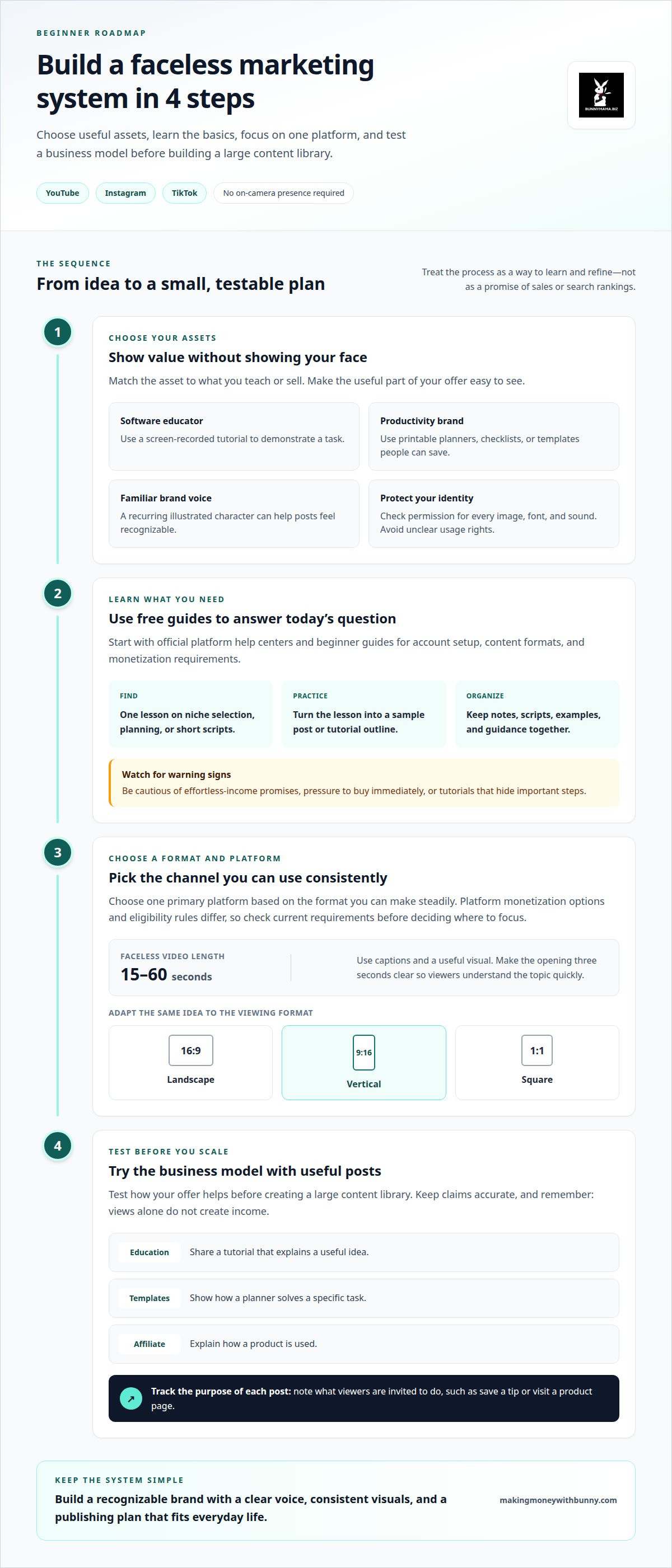
Choose an asset that demonstrates value without requiring your face. A screen-recorded tutorial can work for a software educator; printable planners can support a productivity brand. A recurring illustrated character can make posts feel familiar, while checklists and templates give followers something practical to save. Confirm you have permission to use every image, font, and sound, and avoid building your identity around assets with unclear usage rights.
-
Find Free Resources and Beginner Guides
Start with free platform help centers and beginner guides that explain account setup, content formats, and monetization requirements. Use a social media guide to turn one topic into a short script, carousel, and checklist. Save useful examples in a simple document and note what makes each one clear. Avoid tutorials that promise effortless income or pressure you to buy immediately while hiding important steps.
- Choose one primary platform based on the format you can make consistently. For Instagram and TikTok, try faceless videos between 15 and 60 seconds, using captions and a useful visual. Adapt the same idea for landscape viewing at 16:9, vertical viewing at 9:16, or square posts at 1:1. Make the opening three seconds clear, so viewers quickly understand the topic.
- Test the business model before building a large content library. Educational creators can share tutorials; template sellers can show how a planner solves a specific task; affiliate content can explain how a product is used. Note what each post invites viewers to do, such as save a tip or visit a product page. Keep claims accurate, and don’t assume views alone create income.
What are the best free faceless marketing resources and beginner guides?
Start with resources that help with a task you have today, such as choosing a niche or planning a post. A short, focused learning routine makes it easier to put new ideas into practice instead of collecting guides you never use.
- Use platform help centers for current basics. Read the official creator guidance for YouTube, Instagram, or TikTok before building around one channel. Look for lessons on account setup, content formats, audience insights, and monetization eligibility. Save relevant pages in one document, then note what each platform expects. This keeps your plan grounded in the rules of the channel you use.
- Choose one beginner guide for a single skill. Search for a clear lesson on niche selection, content planning, or writing short scripts. The faceless digital marketing tutorial section at 3:35 can prompt you to think through a niche. Write down the audience, the problem you want to help with, and a few topics you could explain simply.
- Turn each lesson into a small practice task. After studying a guide, draft a sample post or outline a tutorial. For example, turn a common meal-planning question into a text-led tip with a simple visual. Notice where your explanation feels unclear, then revise that part before creating more content.
- Build a tidy reference folder. Keep notes, scripts, examples, and platform guidance together in folders or a basic document. Label each item by purpose, such as “hooks,” “tutorial outlines,” or “content ideas.” Add a note about what you learned and your next action. A small library makes it easier to pick up where you left off.
- Pick support that fits your learning style. If you prefer a guided path, explore DWA 4.0 resources alongside your free platform research. Social media guides can also help organize ideas into practical next steps. Choose one resource, apply one lesson, then review your draft before adding another guide to your routine.
Faceless Marketing Tools: Costs and Needs for Beginners
Start with tools that help you plan, create, and publish without adding clutter. A focused setup gives you room to learn before investing in extra features.
- Set up a planning tool. Use a basic document or spreadsheet to track ideas, scripts, and publishing tasks. For example, create columns for the topic, audience question, format, and next action. A simple setup can handle early planning. Paid options may add collaboration or automation, so choose them only when those features solve a real problem.
- Choose one creation tool for your main format. A phone recorder can capture voiceovers, while a screen recorder can show a tutorial. For text-led posts, use a design tool with editable layouts. Compare export options, file limits, and whether your chosen assets can be used commercially. These details affect usefulness and possible costs.
- Add editing only where it saves effort. An editing app can trim pauses, arrange clips, and add captions to a faceless video. Try one short sample before paying for advanced effects. Costs depend on features such as export quality, storage, and usage limits. Match any plan to your actual publishing needs.
- Keep brand assets organized. Store approved fonts, colors, character illustrations, and reusable layouts in one folder. Track each asset’s source and permitted uses. A paid asset library may offer more choices, but usage rights matter as much as the subscription cost. These checks help you choose suitable faceless marketing resources for beginners without collecting tools you won’t use.
- Review the full workflow before adding subscriptions. Draft a post, edit it, save the final file, and prepare its caption. Note where the process slows down. Pay for a tool only if its features remove that bottleneck. The right mix of faceless marketing resources for beginners depends on your workflow, usage limits, storage, and asset rights, not a fixed starter budget.
How do you build a faceless brand and content strategy step by step?
Use a 30-day planning window to build and test a small system. Treat it as time to learn and adjust, not a promise of income or rankings.
- Choose one audience and one useful outcome. Write down who you want to help and the problem your content addresses. For example, a home organization account might share simple ways to sort a family calendar. A clear focus helps each post feel connected, even when your face never appears.
- Set a recognizable brand voice. Choose a few traits, such as calm, practical, or playful, and use them consistently. Draft a sample caption explaining one tip. A brand character can convey that tone through illustrations or short scripted lines. Keep its name, appearance, and role consistent across posts.
- Choose three content themes. Use audience questions to shape useful categories, such as beginner tips, common mistakes, and step-by-step examples. For a meal-planning brand, one theme could show how to prepare a shopping list. Themes make it easier to plan varied posts without straying from your main subject.
- Map a small publishing routine. Divide your 30-day window into planning, creating, publishing, and reviewing. Prepare a few scripts together, then adapt each idea into a format that suits your chosen platform. Leave room to respond to comments and questions. A manageable rhythm is easier to maintain than a crowded calendar.
- Review signals and refine your next batch. Compare saves, comments, watch time, and link clicks where those measures are available. If viewers leave early, make the opening clearer. If a checklist earns saves, develop another practical example. Use these observations to guide your next posts instead of judging a whole brand by one result.
- Prepare your next planning session. Keep the strongest scripts, visual assets, and audience questions together. If a guided resource would help you organize the process, explore beginner marketing resources as you shape your next content plan.
Bunnymama.biz: DWA 4.0 resources
Bunnymama.biz offers DWA 4.0 resources and social media guides for readers shaping a beginner-friendly marketing routine. Use the guides to organize post ideas, then turn one lesson into a simple content plan that fits your chosen platform.
For a brand built around useful digital assets, Holiday Printables & Kids' Activities and the 50 Christmas Wrapping Paper Templates - Tiffany & Gold Collection | Editable Designs with PLR License offer examples of ready-to-use creative products. They can help you think about how a digital item might support a themed content idea or audience need.
If you’d like a little structure for your next step, visit Bunnymama.biz and explore the resources at your own pace.
Let Your Brand Grow One Clear Step at a Time
A faceless brand doesn’t have to feel distant. Its warmth comes through in the ideas you share, the character you create, and the care behind each post. Let those choices reflect the people you hope to help.
As you move forward, give your audience room to shape what comes next. Notice which questions keep appearing, then use them to guide your next topic or digital asset. Your brand can grow through useful conversations instead of chasing every new trend.
A thoughtful set of faceless marketing resources for beginners can help turn your plans into a routine that feels like your own. Choose a next step that fits the time and energy you have today. Small, steady choices can give your online presence a clearer voice.
If you’d like to talk through the kind of marketing direction you’re building, contact Bunnymama.biz. Keep your next move simple, and let your brand take shape at a pace that feels right for you.
Frequently Asked Questions
What is faceless digital marketing, and how does it work?
Faceless digital marketing promotes a brand without making the creator’s face the main focus. You might share a narrated screen demonstration, a text-based tutorial, or an illustrated character explaining a useful idea. The audience connects with the information, style, and consistency. For example, a home budgeting account could post annotated spreadsheet tips rather than personal talking-head videos.
Can I use AI, stock footage, and voiceovers?
Yes. AI, stock footage, and voiceovers can all be creative tools. Review AI-generated text for accuracy, and make sure stock visuals and audio have usage rights that fit your intended purpose. A voiceover can explain a recipe while close-up cooking footage shows each step. Add your own examples and perspective so the finished content offers more than a generic compilation.
Does faceless mean anonymous or fully automated?
No. Faceless means your content doesn’t rely on showing your face; it doesn’t automatically make you anonymous or remove your involvement. A brand can still have a public name, reply to audience questions, and share a consistent point of view. Scheduling tools may help prepare posts, but thoughtful planning and review keep content relevant and help prevent mistakes.
How do I choose a faceless niche?
Choose a subject where audience needs overlap with what you can explain, demonstrate, or curate consistently. Write down questions people ask about the topic, then draft sample posts that answer them. For example, a beginner gardening account could explain seed labels or share a simple planting checklist. Choose a focus narrow enough to guide content but broad enough to support fresh ideas.
How do faceless businesses make money?
Faceless businesses can earn through digital products, affiliate recommendations, sponsorships, advertising, or services, depending on their model and audience. A recipe creator, for example, might sell a meal-planning download or include a relevant affiliate recommendation. Each option needs a clear offer and useful content that helps people understand it. Review platform terms and disclose paid relationships where required.
Is faceless marketing passive income?
Faceless marketing isn’t automatically passive income. A digital product can remain available after creation, but the business still needs audience reach, product updates, customer support, and content that explains its value. You may also need to respond when platform features or audience interests change. Think of it as building an asset-based business, with ongoing work to maintain and promote what you create.